
Screenshots

App details
- Updated
- Sep 19, 2005
- Language
- English
- Developer
- Xaudio Corporation
- Category
- Mobile
SoftPas in:
This product is also available in the following languages:
About Dart Karaoke
Download Dart Karaoke – Karaoke Studio, Vocal Removal, Lyrics Integration, CD Recording
Overview
Dart Karaoke Studio is a mobile application designed to empower users with the tools needed to create personalized karaoke tracks from their favorite songs. The app enables users to remove lead vocals from audio files, integrate custom lyrics, and even prepare recordings for physical CD playback. It addresses the common challenge of obtaining high-quality instrumental versions of songs without requiring advanced audio editing skills. This makes it particularly useful for amateur singers, home entertainers, and music enthusiasts who wish to enjoy or host karaoke sessions without relying on pre-made tracks.
The app is ideal for individuals who want to customize their music library with tailored karaoke versions, especially those who prefer physical media like CDs for playback at parties or events. While the developer has not provided extensive background information, the app’s functionality suggests a focus on audio processing and user accessibility. The long-standing presence of the app, with a release date of 2005-09-19, indicates a legacy of consistent performance and reliability in the niche of music customization tools.
Real-world use cases include preparing personalized karaoke sets for family gatherings, amateur performances, or even small-scale entertainment events. Its role in the app ecosystem lies in bridging the gap between standard audio files and playable karaoke content, offering a streamlined solution for users seeking creative control over their music experience.
Key Features & Functionality
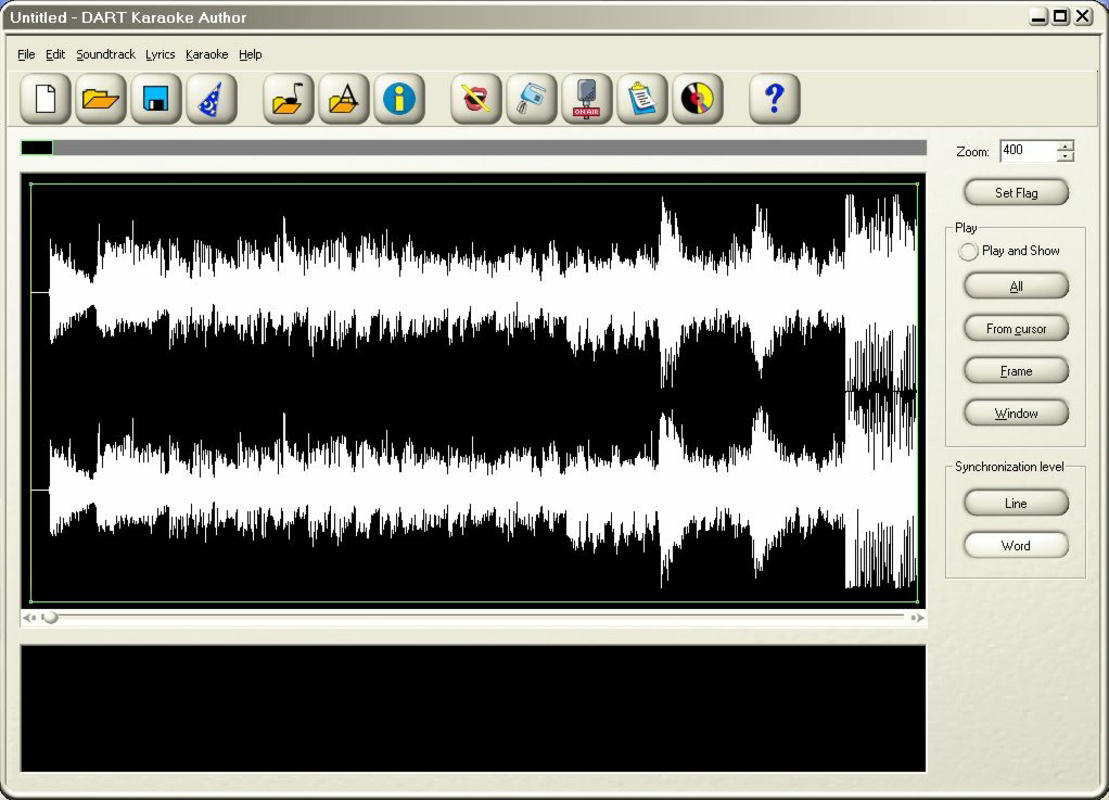
- User-Friendly Interface: Dart Karaoke Studio features a simple, well-organized layout that guides users through each step of creating karaoke tracks. The intuitive design ensures that both beginners and experienced users can navigate the app without confusion.
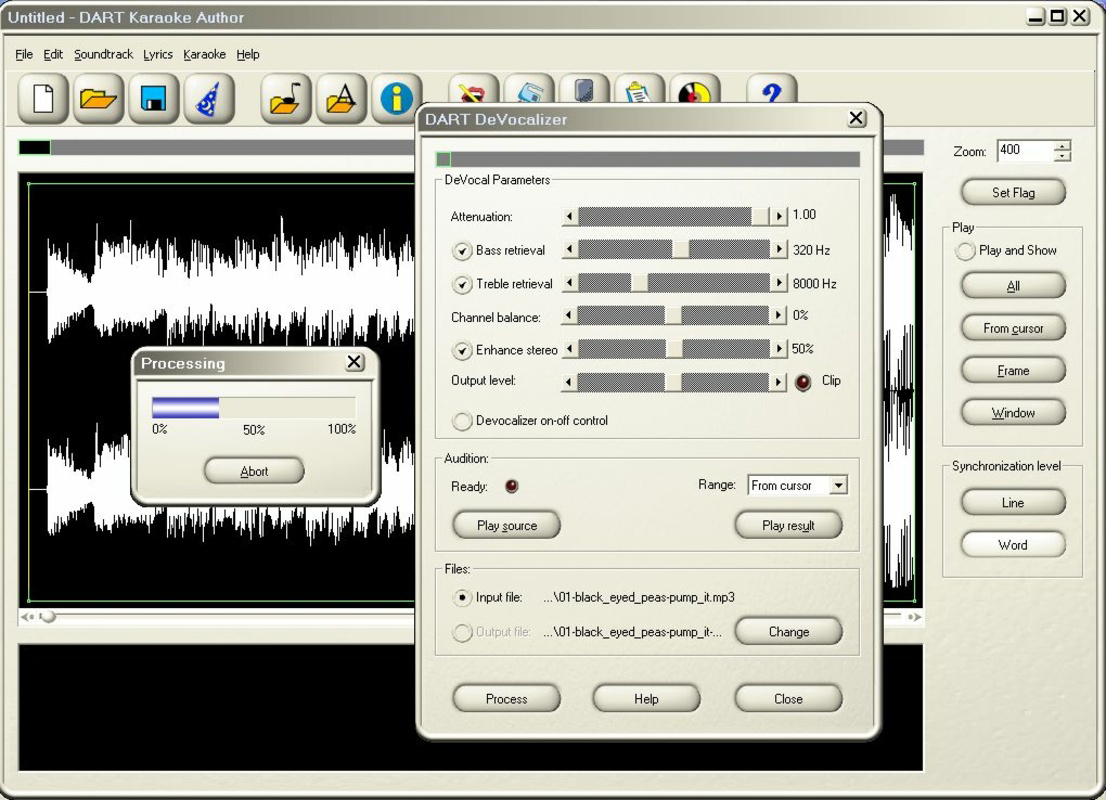
- Vocal Removal Feature: The app effectively removes lead vocals from WAV and MP3 audio files, producing clean instrumental versions. This functionality is particularly valuable for users who want to sing along to songs without the original vocal track.
- Custom Lyrics Integration: Users can add their own lyrics to the audio file, whether they are original compositions or previously created texts. This allows for full personalization of the karaoke experience, including timing and alignment with the music.
- CD Recording Capability: Once the karaoke track is finalized, the app supports recording the output onto a CD. This feature caters to users who prefer physical media for playback on traditional CD players or compatible karaoke systems.
- Support for Popular Audio Formats: Dart Karaoke Studio is compatible with both WAV and MP3 formats, ensuring broad access to a wide variety of music files. This flexibility enhances usability across different music libraries and sources.
For example, a user could take a favorite MP3 song, remove the vocals, add lyrics in sync with the music, and burn the result to a CD for a party. This workflow demonstrates how the app transforms ordinary audio into a ready-to-use karaoke experience.
Interface, UX & Performance
The user interface of Dart Karaoke Studio is structured around simplicity and clarity. Navigation is linear, with clearly labeled sections for importing audio, adjusting settings, adding lyrics, and exporting the final track. The visual design prioritizes functionality over aesthetics, ensuring that users can focus on the task at hand without distractions.
Interaction flow is straightforward: users import a file, apply vocal removal, input lyrics, and proceed to export or burn to CD. This step-by-step process reduces the learning curve and supports efficient workflow completion. The app responds promptly to user inputs, with minimal lag during file processing and navigation.
Although the developer did not list formal performance metrics, the app’s long-standing presence suggests consistent stability across various device types. Users can expect smooth operation on both older and modern smartphones, provided the device supports the required file formats and OS. Responsiveness remains strong during key tasks such as file import and export, contributing to a reliable user experience.
Platform Compatibility & Technical Requirements
Dart Karaoke Studio is available on the Android platform, with the latest version released on 2005-09-19. The app has a file size of 4.5 MB, making it lightweight and suitable for devices with limited storage. Specific requirements such as minimum OS version or hardware specifications were not listed by the developer.
Compatibility information was not fully disclosed, so users should ensure their device supports WAV and MP3 file processing and has the necessary permissions for audio access and CD burning functionality. The app’s age suggests it may not be optimized for the latest Android versions, but its continued availability indicates ongoing support or backward compatibility.
Pros and Cons
Pros
- Simple and intuitive interface suitable for all skill levels
- Effective vocal removal for creating instrumental tracks
- Supports popular audio formats (WAV and MP3)
- Allows custom lyrics integration for personalized karaoke
- Includes CD recording functionality for physical playback
Cons
- Developer did not provide detailed technical specifications
- Compatibility with modern Android versions is uncertain
- No information on file processing speed or performance metrics
- Outdated release date raises questions about current maintenance
- CD recording feature may require external hardware
FAQ
Is Dart Karaoke free to download and use?
The app’s pricing information was not disclosed. Users should verify the current cost before installation.
Can I use Dart Karaoke on iOS devices?
Based on the available data, the app is only confirmed for Android. No information about iOS compatibility was provided.
What audio formats does Dart Karaoke support?
The app supports WAV and MP3 file formats for importing songs and creating karaoke tracks.
Do I need a CD burner to use the CD recording feature?
Yes, the CD recording feature requires a compatible CD burner, either built into the device or connected externally.
How secure is Dart Karaoke when processing audio files?
The developer did not provide details on data privacy or security practices. Users should exercise caution when uploading personal music files.
Final Thoughts
Dart Karaoke Studio stands out as a specialized tool for music enthusiasts seeking to create custom karaoke content with minimal effort. Its core features—vocal removal, lyric integration, and CD recording—deliver tangible value for users who want to personalize their music experience. While the app’s age and lack of updated technical details raise some concerns about modern compatibility, its foundational functionality remains relevant.
It is particularly beneficial for hobbyists, home entertainers, and those who enjoy hosting karaoke nights with physical media. The ability to transform any WAV or MP3 file into a playable karaoke track offers creative freedom and practical utility.
Despite its limitations, the app’s straightforward design and focused purpose make it a worthwhile option for users in need of a no-frills karaoke creation tool. Download Dart Karaoke now
Guides & Tutorials
How to install Dart Karaoke
- Click the Download button above.
- Once redirected, accept the terms and click Install.
- Wait for the Dart Karaoke download to finish on your device.
How to use Dart Karaoke
This software is primarily used for its core features described above. Open the app after installation to explore its capabilities.
User Reviews
No reviews yet. Be the first to share your experience.
You may also like
more
Que no te pillen¡
About !Que no te pillen¡Reviewed by Jason A. BilbreyShow MoreShow Less

3D Combat Zone
About 3D Combat ZoneOriginally released in 1983, 3D Combat Zone immerses players...

666: El día del portal
About 666: El día del portalOn June 6, 2006, Agent P. Stone uncovers a sinister...

80 in 1 Best Flash games
About 80 in 1 Best Flash games 80 in 1 Best Flash games is a collection of 80 fl...

ABYSS SEEKERーーWhat Do You See Deep in The Abyss
About ABYSS SEEKERーーWhat Do You See Deep in The AbyssIn ABYSS SEEKER, players...

ACA NEOGEO THE KING OF FIGHTERS 2002 for Windows
About ACA NEOGEO THE KING OF FIGHTERS 2002 for WindowsTHE KING OF FIGHTERS 2002,...